> ## Documentation Index
> Fetch the complete documentation index at: https://checkly-422f444a-paula-tree-202-entitlements-group-troubles.mintlify.site/llms.txt
> Use this file to discover all available pages before exploring further.
# Writing assertions for API checks
> Writing assertions for API checks
The response of an API request can be checked for correctness and timeliness by using assertions on the response data. Assertions are flexible statements that combine preset modifiers with custom values to meet the needs of a broad set of use cases.
## How assertions work
Assertions are statements you create that check one aspect of the HTTP response. You can create multiple assertions for one check that assert various aspects of a response, for example:
* HTTP response status equals 200.
* HTTP response body equals the text "success".
* HTTP response time is lower than 2000 milliseconds.
* HTTP response header "X-Custom-Header" equals "SomeValue".
* HTTP response JSON object has a key called "accountBalance" with a value greater than 9999
In each assertion, a **source** is connected to a **comparison** and a **target**.
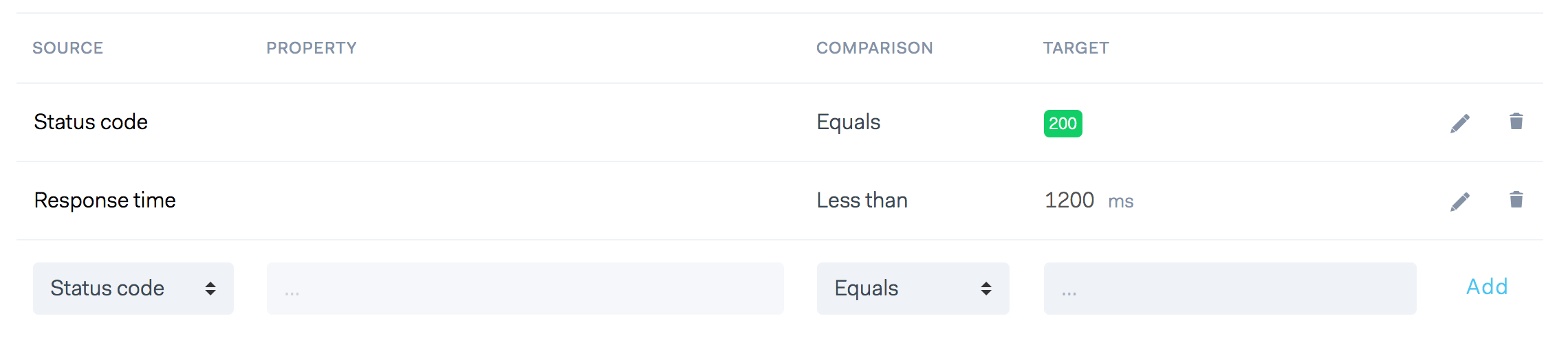 In some cases a **property** is added, for example when asserting headers or JSON response bodies.
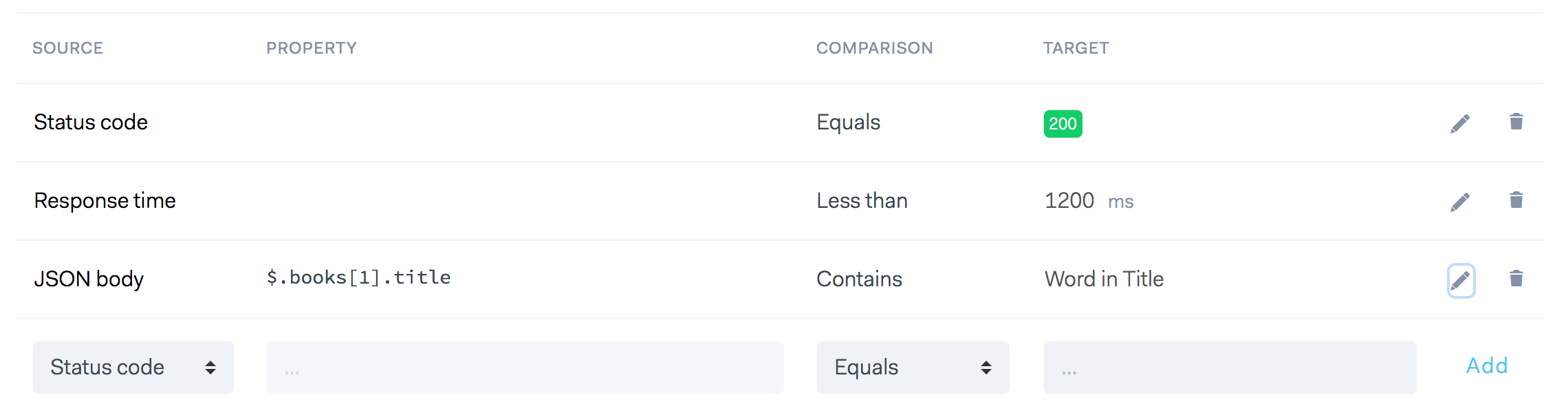 Assertions are executed from top to bottom. If one assertion fails, the full check is considered as failed.
## Source
On each API check assertion, the following sources are available:
* **Status code:** The HTTP response status, parsed as an integer.
* **JSON body:** The response body parsed as a JSON object.
* **Text body:** The response body as plain text.
* **Headers:** The response headers as an array of key/value pairs.
* **Response time:** The response time of the full API request in milliseconds, parsed as an integer value.
## Property
The property field is a free form text field used to identify the name of a header, the part of a JSON object using JSON path or part of a text body.
* With **JSON response bodies**, the property field accepts **JSON path** expressions in the form of dot-separated strings to
target nested properties in an object, i.e. `$.product.size` or an item in an array, i.e. `$.[1].key`
* With **text response bodies**, the property field accepts a **regular expression** with a capture group to pick out parts,
i.e. ``
* With **headers**, you provide the header you want to assert in the property field, i.e. `Content-Type`. You can even add a
regular expression after that to tease out a specific part of the header.
Read more about asserting JSON response bodies below.
## Comparison
Comparisons are the operators that work on the source data and target data, e.g.
* Response time is `LESS THAN` 150 milliseconds.
* Status code `EQUALS` 200.
* Header X-MY-HEADER `CONTAINS` the string `some value`.
The following comparisons are available. Note that some comparisons don't make sense when paired with a specific source.
Response time is empty? JSON Object is less than? We block out the comparisons when they are not applicable to the source.
* Equals / Not equals
* Is empty / Not empty
* Greater than
* Less than
* Contains / Not contains
* Is null / Not null
* Has key / Not has key (deprecated)
* Has value / Not has value (deprecated)
The **Has key** and **Has value** comparison are deprecated. They belong to our [old style of asserting JSON objects]() before we introduced JSON Path
## Target
The target field is a free form text field that determines the desired outcome of your assertion.
## JSON responses with JSON path
You can use **JSON path** to specify which field of a JSON response body should be asserted. JSON path is a query language
similar to Xpath for XML, but in general a lot more intuitive and simpler to use.
> For Checkly to be able to parse the JSON body, the `Content-Type` header of the response should be set to `application/json`.
### JSON path primer
JSON path only uses a handful of operators in its queries. Not all of them are useful in the context of assertions.
Here is an adapted set of examples based on [Stefan Goessner's 2007 introduction post](http://goessner.net/articles/JsonPath/).
| JSONPath | Description |
| ------------------ | -------------------------------------------------------------------- |
| `$` | The root object/element |
| `@` | The current object/element |
| `.` | Child member operator |
| `..` | Recursive descendant operator; JSONPath borrows this syntax from E4X |
| `*` | Wildcard matching all objects/elements regardless their names |
| `[]` | Subscript operator |
| `[,]` | Union operator for alternate names or array indices as a set |
| `[start:end:step]` | Array slice operator borrowed from ES4 / Python |
| `?()` | Applies a filter (script) expression via static evaluation |
| `()` | Script expression via static evaluation |
| `.length` | returns the length of an array |
> JSON path expressions in Checkly assertions must start with a `$` (The root object/element) symbol.
Given this sample data set, see example expressions below:
```javascript theme={null}
{
"store": {
"book": [
{
"category": "reference",
"author": "Nigel Rees",
"title": "Sayings of the Century",
"price": 8.95
}, {
"category": "fiction",
"author": "Evelyn Waugh",
"title": "Sword of Honour",
"price": 12.99
}, {
"category": "fiction",
"author": "Herman Melville",
"title": "Moby Dick",
"isbn": "0-553-21311-3",
"price": 8.99
}, {
"category": "fiction",
"author": "J. R. R. Tolkien",
"title": "The Lord of the Rings",
"isbn": "0-395-19395-8",
"price": 22.99
}
],
"bicycle": {
"color": "red",
"price": 19.95
}
}
}
```
JSON path expressions using the store example above:
| JSONPath | Description |
| ------------------------------------------------- | ----------------------------------------------------------- |
| `$.store.book[*].author` | The authors of all books in the store |
| `$..author` | All authors |
| `$.store.*` | All things in store, which are some books and a red bicycle |
| `$.store..price` | The price of everything in the store |
| `$.store.book.length` | The length of the book array |
| `$..book[2]` | The third book |
| `$..book[(@.length-1)]` | The last book via script subscript |
| `$..book[-1:]` | The last book via slice |
| `$..book[0,1]` | The first two books via subscript union |
| `$..book[:2]` | The first two books via subscript array slice. |
| `$..book[?(@.isbn)]` | Filter all books with isbn number |
| `$..book[?(@.price<10)]` | Filter all books cheaper than 10 |
| `$..book[?(@.price==8.95)]` | Filter all books that cost 8.95 |
| `$..book[?(@.price<30 && @.category=="fiction")]` | Filter all fiction books cheaper than 30 |
| `$..*` | All members of JSON structure |
Use this [online editor to play around](https://jsonpath.com/), or look at the examples below. We use this [jsonpath NPM
module](https://github.com/dchester/jsonpath) under the hood.
### Asserting basic types
Asserting string, boolean and number values works exactly as you'd expect, e.g. the example below asserts the number value of
the `id` property is greater than `2000`.
Assertions are executed from top to bottom. If one assertion fails, the full check is considered as failed.
## Source
On each API check assertion, the following sources are available:
* **Status code:** The HTTP response status, parsed as an integer.
* **JSON body:** The response body parsed as a JSON object.
* **Text body:** The response body as plain text.
* **Headers:** The response headers as an array of key/value pairs.
* **Response time:** The response time of the full API request in milliseconds, parsed as an integer value.
## Property
The property field is a free form text field used to identify the name of a header, the part of a JSON object using JSON path or part of a text body.
* With **JSON response bodies**, the property field accepts **JSON path** expressions in the form of dot-separated strings to
target nested properties in an object, i.e. `$.product.size` or an item in an array, i.e. `$.[1].key`
* With **text response bodies**, the property field accepts a **regular expression** with a capture group to pick out parts,
i.e. ``
* With **headers**, you provide the header you want to assert in the property field, i.e. `Content-Type`. You can even add a
regular expression after that to tease out a specific part of the header.
Read more about asserting JSON response bodies below.
## Comparison
Comparisons are the operators that work on the source data and target data, e.g.
* Response time is `LESS THAN` 150 milliseconds.
* Status code `EQUALS` 200.
* Header X-MY-HEADER `CONTAINS` the string `some value`.
The following comparisons are available. Note that some comparisons don't make sense when paired with a specific source.
Response time is empty? JSON Object is less than? We block out the comparisons when they are not applicable to the source.
* Equals / Not equals
* Is empty / Not empty
* Greater than
* Less than
* Contains / Not contains
* Is null / Not null
* Has key / Not has key (deprecated)
* Has value / Not has value (deprecated)
The **Has key** and **Has value** comparison are deprecated. They belong to our [old style of asserting JSON objects]() before we introduced JSON Path
## Target
The target field is a free form text field that determines the desired outcome of your assertion.
## JSON responses with JSON path
You can use **JSON path** to specify which field of a JSON response body should be asserted. JSON path is a query language
similar to Xpath for XML, but in general a lot more intuitive and simpler to use.
> For Checkly to be able to parse the JSON body, the `Content-Type` header of the response should be set to `application/json`.
### JSON path primer
JSON path only uses a handful of operators in its queries. Not all of them are useful in the context of assertions.
Here is an adapted set of examples based on [Stefan Goessner's 2007 introduction post](http://goessner.net/articles/JsonPath/).
| JSONPath | Description |
| ------------------ | -------------------------------------------------------------------- |
| `$` | The root object/element |
| `@` | The current object/element |
| `.` | Child member operator |
| `..` | Recursive descendant operator; JSONPath borrows this syntax from E4X |
| `*` | Wildcard matching all objects/elements regardless their names |
| `[]` | Subscript operator |
| `[,]` | Union operator for alternate names or array indices as a set |
| `[start:end:step]` | Array slice operator borrowed from ES4 / Python |
| `?()` | Applies a filter (script) expression via static evaluation |
| `()` | Script expression via static evaluation |
| `.length` | returns the length of an array |
> JSON path expressions in Checkly assertions must start with a `$` (The root object/element) symbol.
Given this sample data set, see example expressions below:
```javascript theme={null}
{
"store": {
"book": [
{
"category": "reference",
"author": "Nigel Rees",
"title": "Sayings of the Century",
"price": 8.95
}, {
"category": "fiction",
"author": "Evelyn Waugh",
"title": "Sword of Honour",
"price": 12.99
}, {
"category": "fiction",
"author": "Herman Melville",
"title": "Moby Dick",
"isbn": "0-553-21311-3",
"price": 8.99
}, {
"category": "fiction",
"author": "J. R. R. Tolkien",
"title": "The Lord of the Rings",
"isbn": "0-395-19395-8",
"price": 22.99
}
],
"bicycle": {
"color": "red",
"price": 19.95
}
}
}
```
JSON path expressions using the store example above:
| JSONPath | Description |
| ------------------------------------------------- | ----------------------------------------------------------- |
| `$.store.book[*].author` | The authors of all books in the store |
| `$..author` | All authors |
| `$.store.*` | All things in store, which are some books and a red bicycle |
| `$.store..price` | The price of everything in the store |
| `$.store.book.length` | The length of the book array |
| `$..book[2]` | The third book |
| `$..book[(@.length-1)]` | The last book via script subscript |
| `$..book[-1:]` | The last book via slice |
| `$..book[0,1]` | The first two books via subscript union |
| `$..book[:2]` | The first two books via subscript array slice. |
| `$..book[?(@.isbn)]` | Filter all books with isbn number |
| `$..book[?(@.price<10)]` | Filter all books cheaper than 10 |
| `$..book[?(@.price==8.95)]` | Filter all books that cost 8.95 |
| `$..book[?(@.price<30 && @.category=="fiction")]` | Filter all fiction books cheaper than 30 |
| `$..*` | All members of JSON structure |
Use this [online editor to play around](https://jsonpath.com/), or look at the examples below. We use this [jsonpath NPM
module](https://github.com/dchester/jsonpath) under the hood.
### Asserting basic types
Asserting string, boolean and number values works exactly as you'd expect, e.g. the example below asserts the number value of
the `id` property is greater than `2000`.
 ### Nested properties
You can traverse a JSON object using a dot notation. In the example below we are checking the string-based `size`
property that is part of the `product` object in the JSON response.
### Nested properties
You can traverse a JSON object using a dot notation. In the example below we are checking the string-based `size`
property that is part of the `product` object in the JSON response.
 This next example checks for a **boolean** value in the `owner.site_admin` property:
 ### Asserting arrays
For response bodies with JSON arrays you use JSON path's `[]` expressions.
In the first example below we check if the first item in our result array has a property `title`:
### Asserting arrays
For response bodies with JSON arrays you use JSON path's `[]` expressions.
In the first example below we check if the first item in our result array has a property `title`:
 In the next example we pick the last item in the array and check if the `customerId` property has the value `123abc`:
 In this example we pick the item with index value 4. This is the 5th item as array indexes start at 0. We then assert
that the `responseTime` property is less than `2000`.
In this example we pick the item with index value 4. This is the 5th item as array indexes start at 0. We then assert
that the `responseTime` property is less than `2000`.
 In the last example we check if the returned array has more than 10 items.
 > If the JSON path expression in an assertion returns an array of values, Checkly will perform the comparison for
> **every element of the array**, chaining them with a logical `AND` (&&).
> For example, if the JSON path expression returns an array: `[1,5,2]`, and we use a `Less than` comparison, with `3`
> as the target, the assertion **will fail**, because the comparison is **falsy** for the second element of the array
> (`5` is greater than `3`).
## Deprecated: Custom, non-JSON path properties
Before we released the feature to use JSON path queries, Checkly had a custom way of querying the contents of a JSON
response body.
This method is still available for backwards compatibility reasons, but no longer advised as it is much less flexible and
powerful.
## Using regular expressions
Regular expressions give you the power to extract specific parts of text from a larger text using **capturing groups**.
You can use regular expressions with two assertions sources:
1. **Text body:** Use the property field to add your regex.
2. **Headers:** First select the header you are interested in the property field, then click "add regex".
Under the hood, we use the stock Javascript regular expressions implementation. Specifically, we use the [.match()](https://developer.mozilla.org/en-US/docs/Web/JavaScript/Reference/Global_Objects/String/match)
method. We *do not use the `/g` modifier* and return the first matched group the expression finds.
Sounds more complicated than it is. Here is an example:
```javascript theme={null}
const paragraph = 'The quick brown fox jumps over the lazy dog. It barked.'
const regex = /quick (.*) fox/
const found = paragraph.match(regex)
console.log(found)
// [ 'quick brown fox',
// 'brown',
// index: 4,
// input: 'The quick brown fox jumps over the lazy dog. It barked.' ]
```
In the example above we return the string `brown` because it is the first capture group, the `(.*)` bit.
The first item `quick brown fox` is the full match, which we do not return.
> Remember: regular expressions in assertions only return the **first capturing group**
### Text body assertions with regular expressions
If our API returns HTML, there might be a `lang="en"` attribute in the `` element. We can capture the two character
country/language code value of that attribute with the following expression.
> If the JSON path expression in an assertion returns an array of values, Checkly will perform the comparison for
> **every element of the array**, chaining them with a logical `AND` (&&).
> For example, if the JSON path expression returns an array: `[1,5,2]`, and we use a `Less than` comparison, with `3`
> as the target, the assertion **will fail**, because the comparison is **falsy** for the second element of the array
> (`5` is greater than `3`).
## Deprecated: Custom, non-JSON path properties
Before we released the feature to use JSON path queries, Checkly had a custom way of querying the contents of a JSON
response body.
This method is still available for backwards compatibility reasons, but no longer advised as it is much less flexible and
powerful.
## Using regular expressions
Regular expressions give you the power to extract specific parts of text from a larger text using **capturing groups**.
You can use regular expressions with two assertions sources:
1. **Text body:** Use the property field to add your regex.
2. **Headers:** First select the header you are interested in the property field, then click "add regex".
Under the hood, we use the stock Javascript regular expressions implementation. Specifically, we use the [.match()](https://developer.mozilla.org/en-US/docs/Web/JavaScript/Reference/Global_Objects/String/match)
method. We *do not use the `/g` modifier* and return the first matched group the expression finds.
Sounds more complicated than it is. Here is an example:
```javascript theme={null}
const paragraph = 'The quick brown fox jumps over the lazy dog. It barked.'
const regex = /quick (.*) fox/
const found = paragraph.match(regex)
console.log(found)
// [ 'quick brown fox',
// 'brown',
// index: 4,
// input: 'The quick brown fox jumps over the lazy dog. It barked.' ]
```
In the example above we return the string `brown` because it is the first capture group, the `(.*)` bit.
The first item `quick brown fox` is the full match, which we do not return.
> Remember: regular expressions in assertions only return the **first capturing group**
### Text body assertions with regular expressions
If our API returns HTML, there might be a `lang="en"` attribute in the `` element. We can capture the two character
country/language code value of that attribute with the following expression.
 The expression `lang="(.{2})"` means 'grab any of the first two characters between `lang="` and the next `"`'. If we were
sure there are only non-capital characters, we could tighten it up a bit with `lang="([a-z]*)"`.
### Header assertions with regular expressions
We can use regular expressions with headers too. In this example, we check if the `max-age` property of a `Strict-Transport-Security`
response header is above a `100000`
The expression `lang="(.{2})"` means 'grab any of the first two characters between `lang="` and the next `"`'. If we were
sure there are only non-capital characters, we could tighten it up a bit with `lang="([a-z]*)"`.
### Header assertions with regular expressions
We can use regular expressions with headers too. In this example, we check if the `max-age` property of a `Strict-Transport-Security`
response header is above a `100000`
